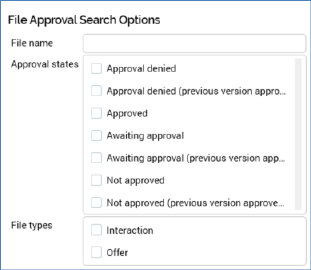
The Approval Summary toolbar exposes the following options:
•Show/Hide File Approval Search Options: invocation of this option displays or hides the File Approval Search Options dialog (as appropriate).
The dialog contains the following:
o File name: you can limit the files listed to only those that match the specified search string
o Approval states: checkboxes are shown alongside the following approval states:
§ Not approved
§ Awaiting approval
§ Approval denied
§ Approved
§ Not approved (previous version approved)
§ Awaiting approval (previous version approved)
§ Approval denied (previous version approved)
All are unchecked by default. You can limit the files listed to only those with approval statuses matching your selections.
o File types: checkboxes are also shown alongside the following file types:
§ Interaction
§ Offer
Again, all are unchecked by default.
The dialog is removed from display when you invoke Search. If you provided search options, they are applied when search results are returned.
•Search: invocation of this option filters the list of files in accordance with the selected search options.
•Open the latest version of the selected file: displays the latest version of the file in an appropriate designer instance. If the version in question is already open, its designer receives the focus.
•Previous page: this option is only available when the initial page of results is not shown. Invocation displays the previous page's worth of results.
•Next page: this option is only available when the final page of results is not shown. Invocation displays the next page's worth of results