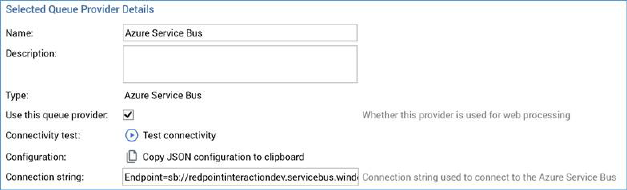
When a queue provider is selected in the list, its details are shown in the Selected Queue Provider Details section.
The following common properties are shared by all queue provider types:
•Name: this mandatory property must be unique and can be a maximum of 100 characters in length.
•Description: this optional property can be a maximum of 1000 characters in length.
•Type: this read-only property is defined at the queue provider's creation, and is set to one of the following values:
o Amazon Simple Queue Service
o Apache ActiveMQ
o Azure Service Bus
o Azure Event Hubs
o Google PubSub
o Microsoft Message Queuing
o IBM MQ
o RabbitMQ
o Kafka
•Use this queue provider: this checkbox is unchecked by default at a newly-created queue by default. A validation error is raised at invocation of Save if the property is checked at more than one queue provider.
•Configuration: the accompanying button displays the text Copy JSON configuration to clipboard. Clicking it copies to the clipboard a JSON snippet, which must be inserted at the ‘ClientQueueSettings’ element at the RPI Realtime website's appsettings.json file. The snippet is structured as per the following example:
{"Assembly":"RedPoint.Resonance.AzureQueueAccess","Type":"RedPoint.Resonance.AzureQueueAccess.AzureServiceBusQueueFactory","Settings":[{"Key":"ConnectionString","Value":"Endpoint=sb://redpointinteractiondev.servicebus.windows.net/;SharedAccessKeyName=RootManageSharedAccessKey;SharedAccessKey=EcWsxCsX+xOLQCdt0H6kScI1bR252V+WGljpou5MjwQ=","Values":null}]}
An informational message confirms that the text has been copied to the clipboard.