
The following message is displayed when no realtime layouts have been configured at the current RPI client:
If one or more realtime layouts has been configured, they are displayed in the list.
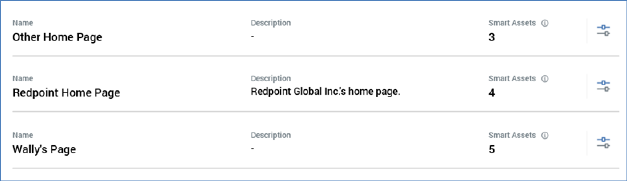
Realtime layouts are ordered alphabetically. The following are displayed for each realtime layout:
•Name
•Description
•Smart Assets: an information tooltip accompanies this property:

Details on Layouts and Areas are provided elsewhere in this documentation.
•Manage this Realtime Layout: clicking this button displays the realtime layout's details in the Manage Realtime Layout overlay (covered elsewhere in this documentation).
An Add New Realtime Layout button is displayed at the bottom of the list:

Clicking the button displays the Add Realtime Layout overlay (covered elsewhere in this documentation).