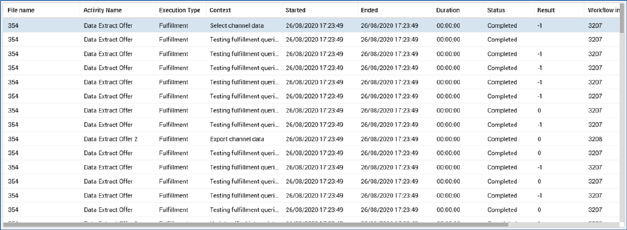
The grid is populated automatically on displaying the tab for the first time, in accordance with the default search criteria.
Following execution of a search, any matching log entries are listed in the Query Trace Log grid. If no matching entries exist, a message is displayed. Log entries are ordered by Started date. For each log entry, the following properties are displayed:
•File Name
•Activity Name: blank if selection rule
•Execution Type: one of Audience , Fulfillment, Selection rule or Analysis Panel
•Context: describing the scenario in which the SQL execution occurred
•Started: date/time
•Ended: date/time
•Duration: HH:MM:SS
•Status
•Result: if a select query, the number of records returned. If a non-query transaction (e.g. an insert or update), 0 (False) or -1 (True).
•Workflow Instance ID
•Activity ID: GUID
•File ID: GUID
Note that the time for which RPI will wait before adding a Query Trace log for a long-running query is controlled by system configuration setting LongQueryTraceLimit.