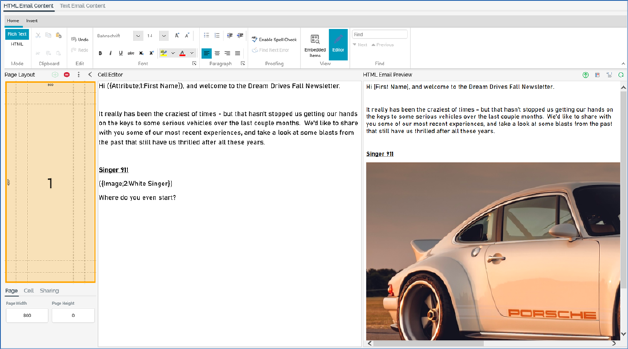
HTML email content can be entered in a series of ‘cells’, defined within the Page Layout section. Cells can be grid-based or sited within an HTML template (for more information on creating HTML templates, please see the HTML asset within the Asset Designer documentation).
A cell can contain content entered via a rich text editor, or as raw HTML. In addition, an asset or smart asset can be assigned directly to a cell. A preview panel, displayed to the right of the HTML Email Content tab, provides a visualization of the email’s final assembly from its constituent parts.
The HTML Email Content tab contains the following elements:
•Content Editor Toolbar
•Page Layout section
•Cell Editor
•HTML Email Preview section
Each of these is documented separately.