This section is displayed in the following contexts:
•Email Offer Designer - HTML Email Content - Rich Text mode
•Landing Page Designer - Rich Text mode
•Asset Designer - HTML Asset - Rich Text mode
•Wiki Page Designer - Rich Text mode
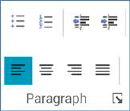
The Home tab’s Paragraph section exposes the following commands:
•Bullets
•Numbering
•Decrease Indent
•Increase Indent
•Align Text Left: selected by default.
•Center
•Align Text Right
•Justify
•Show the Paragraph dialog box: clicking this button, which is shown at the bottom right of the Paragraph section, displays the Paragraph Properties dialog box, which is documented separately.