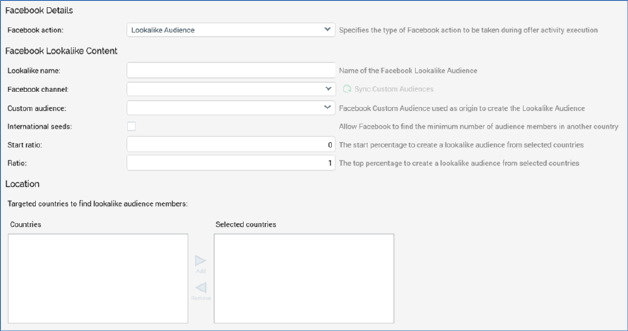
This section is used to create an audience that closely matches a selected Custom Audience. It is displayed when Facebook action is set to Lookalike Audience. It contains the following:
•Lookalike name: this mandatory property can be a maximum of 200 characters in length. It represents the name of the Facebook Lookalike Audience to be used by the offer.
•Channel: you must select a Facebook channel to be used by the offer. Having selected a channel, click the accompanying Sync Custom Audiences button to load the Custom audience dropdown.
•Custom audience: you must select a custom audience to serve as the basis for the lookalike audience to be created at execution of the offer. A dropdown list, it is populated on clicking Sync Custom Audiences.
•International seeds: this checkbox is unchecked by default. When checked, Facebook will source lookalike audience members from other countries. Facebook requires a minimum of at least 100 seed audience members (based on the selected Custom Audience) from a selected country for a Lookalike Audience to be created. If the seed count is below 100 and this is option is checked, Facebook finds the minimum number of audience members from another country.
•Start ratio: this numeric property allows you to specify the starting percentage for the portion of Facebook users who are most likely similar to your selected Custom Audience. When creating a Lookalike audience, Facebook takes the selected Custom Audience’s users, then matches with users that closely resemble the Custom Audience in a selected country. This matching is expressed as a percentage. A Start ratio of 0 and Ratio of 1 means you want your Lookalike audience to take the top 1% of users that most closely resemble your Custom Audience. A lower percentage has a lower reach but has a higher degree of similarity to the selected Custom Audience. The property defaults to 0, which is also the minimum permitted value, and accepts a maximum value of 9. Note that Start ratio must be lower than Ratio.
•Ratio: this numeric property is used in conjunction with Start ratio. It defaults to 1, which is also the minimum permitted value, and accepts a maximum value of 10.