An audience snapshot allows you to improve query performance by persisting the results of the execution of a commonly-run audience in a data warehouse table. You can then build attributes from this table, which you can leverage to build highly performant selection rules (which can, in turn, be used in other audiences).
For example, suppose you have a complex audience, execution of the logic in which takes several hours. Suppose also that the data queried by the audience is refreshed once a week. You can build an audience snapshot that executes the rules in the audience and writes the results to a data warehouse table. It then becomes a simple exercise to build attributes based on the snapshot table and use them to identify the persons targeted by the original audience (and, if required, the segments within which they qualify). These can then be used in selection rules, and, in turn, in an audience that executes much more quickly than the original.
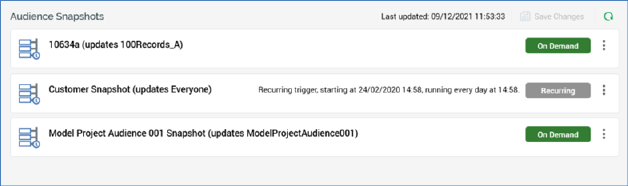
Management of the execution of audience snapshots is carried out in the Audience Snapshots tab within the Operations interface.
A separate Audience Snapshots configuration interface is found in the Configuration Workbench; this is used to define audience snapshots. It is recommended that you save any changes to audience snapshots’ operational configuration, and close the Operations interface, before administering audience snapshots in the Configuration Workbench.
The Audience Snapshots tab contains the following: